
cheap way to call internationally
The Cheap Way to Call Internationally Without the Hassle

We've all been there. You make one quick call overseas to check on family or a business partner, and a month later, your phone bill has a nasty surprise waiting for you. That feeling of dread—of having to watch the clock every second you’re on an international call—is exactly why so many people are looking for a better way.
The good news? Those days of ridiculously expensive international calls are over. You no longer have to mess with confusing calling cards loaded with hidden fees or convince everyone you know to download the same app just to talk. The options today are simpler, cheaper, and way more direct.
This guide is designed to cut through all that noise. We’ll show you just how easy and affordable it can be to stay connected with anyone, anywhere in the world.
The massive demand for affordable global calling has completely changed the game. In fact, the market for international call services hit USD 1.44 billion in 2024 and is on track to nearly double by 2032. You can dig into more of the data on this shift at Data Bridge Market Research.
This isn't just a random statistic—it means the power has shifted back to you. Instead of being stuck with your mobile carrier’s outrageous rates, you can now pick from a handful of great options that actually fit your needs.
The main players now are:
The secret is simple: all of these methods use the internet to bypass the old, expensive telephone networks. That’s how a five-minute call to Europe can cost you less than a coffee instead of adding a huge charge to your phone bill.
Our goal here is to give you a clear path forward. We'll break down each of these methods, look at their real-world pros and cons, and then walk you through setting up an instant solution so you can start making cheaper calls today.
Finding the cheapest way to call internationally means picking the right tool for the job. What works for a quick chat with your cousin might be a terrible choice for an important business call. Let’s break down the most popular options to see how they really stack up.
Apps like WhatsApp, Viber, and FaceTime are everywhere because they're free. They use your internet connection (VoIP) to connect you with someone else using the same app. But there's a huge catch: the person you're calling must have the exact same app installed.
This is perfect if you’re calling a tech-savvy friend. It's a total non-starter, though, if you need to reach a landline—like your grandmother’s house—or a business that doesn't use the app. Call quality can be a gamble, too, since it depends entirely on the internet speed at both ends.
For a deeper look at the different apps out there, check out our guide on the best international calling apps.
Calling cards feel like a throwback, but they're still around. You buy a card with a fixed amount of credit, dial a long access number, punch in a PIN, and then finally dial the international number. They can seem cheap, but they often sting you with hidden connection fees and credits that vanish unexpectedly.
eSIMs are the modern traveler's solution. You buy a digital data plan for the country you're visiting, which lets you use internet-based apps without hunting for spotty public Wi-Fi. It’s a great way to stay connected on the go, but it doesn’t solve the problem of directly calling a regular phone number.
Key Takeaway: Calling cards add a layer of complexity with PINs and access codes, while eSIMs are really just for data. Neither offers the simple, direct experience of just dialing a number.
This is where things get simple and affordable. A browser-based service like YodelPhone lets you make international calls right from your web browser. No downloads, no installations, and the person on the other end doesn't need any special software. You just type in the number and click to call.
This flowchart lays it out pretty clearly.
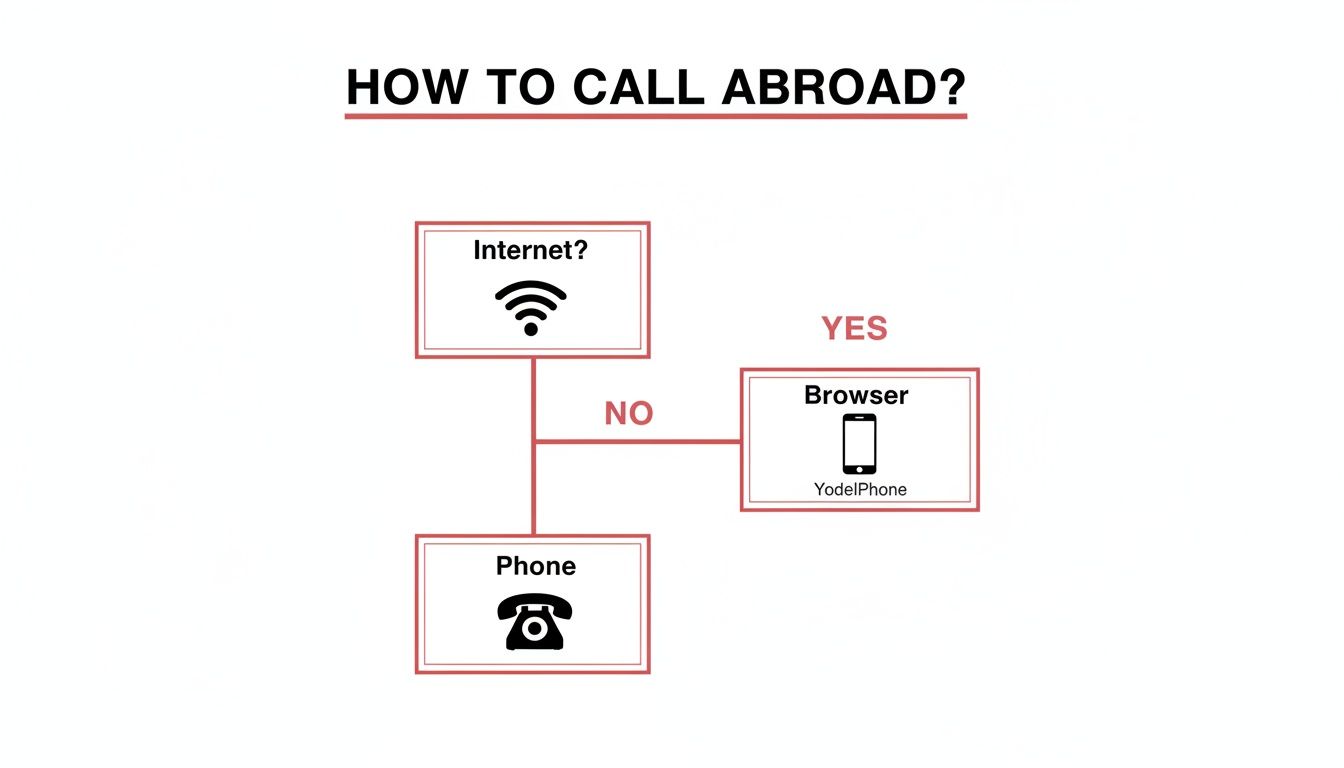
If you have an internet connection, a browser-based tool is the most direct and hassle-free path.
This isn't just a niche market; it's a massive part of the global communications industry. Cross-border calls are the main money-maker for VoIP services, with 58.5% of global VoIP revenue coming from international minutes. That means companies are heavily invested in making these connections work flawlessly.
The biggest win here is simplicity. You get transparent, pay-as-you-go pricing, so you only ever pay for the minutes you actually use. It works the same whether you're calling a mobile or a landline, making it the most versatile and reliable option out there.
With so many choices, it helps to see everything side-by-side. I've put together this table to quickly compare the most common ways to call abroad.
| Calling Method | Best For | Typical Cost Structure | Pros | Cons |
|---|---|---|---|---|
| VoIP Apps (WhatsApp, Viber) | Calling other app users | Free (uses your data) | Free for app-to-app calls | Can't call landlines; requires app on both ends |
| Browser Service (YodelPhone) | Anyone with a phone number | Pay-per-minute | Calls any number; no downloads; transparent pricing | Requires an internet connection |
| Traditional Calling Cards | People without internet or smartphones | Pay-per-minute + hidden fees | No internet needed | Confusing PINs; hidden fees; expiring credits |
| Local SIM/eSIM Cards | Travelers needing mobile data | Data plan purchase | Good for data usage while abroad | Not for direct dialing; can be expensive |
Each method has its place, but for pure convenience and cost-effectiveness when calling any phone number directly, browser-based services are hard to beat. They combine the low costs of VoIP with the universal reach of a traditional phone call.
Alright, enough theory. Let's get down to actually making a call.
Forget about scrolling through an app store or hunting down a physical calling card at a convenience store. The fastest and cheapest way to call another country is usually the one with the fewest hoops to jump through. Browser-based services like YodelPhone are built for exactly this—getting you connected in seconds, not minutes.
The entire process unfolds right in your web browser. It doesn’t matter if you're on a laptop, tablet, or your phone. There are no long sign-up forms to fill out, no software to install, and you don't have to awkwardly ask the person you're calling to download a specific app. You just head to the site, punch in the number, and hit call.
The real beauty of a web-based calling platform is how immediate it is. It vaporizes all the usual barriers that stand between you and a conversation. Just think about the last time you tried a new app—you had to find it, wait for it to download, create an account, maybe verify your email or phone number. It's a whole process.
Here, all of that is gone. With a service like YodelPhone, you can even test it out with a one-minute free trial call without pulling out your credit card. This is perfect for checking the call quality and seeing just how easy it is before you decide to add any funds.
You’ll be met with a simple, clean interface. No clutter, no confusion.

It’s intentionally designed to look and feel just like your phone’s regular dialer. There's zero learning curve.
Ready to give it a try? The process is as simple as it looks. You don’t need to be tech-savvy; you just need the phone number you want to dial.
Here’s how it works:
And that’s it. In seconds, you'll hear the phone ringing on the other side of the world. The call is routed over the internet using VoIP (Voice over Internet Protocol), which keeps the connection clear and stable as long as you have a decent Wi-Fi or data signal.
If you want a more detailed walkthrough, our guide on how to make international calls covers every little detail.
Pro Tip: Before you dial, grab a headset. While your computer's built-in mic and speakers work fine, even a basic pair of headphones will dramatically improve your audio quality. It cuts out background noise and makes the conversation clearer for both you and the person you're calling.
This approach is so effective because it blends the low cost of internet calling with the universal reach of a traditional phone network. You're not stuck calling only people who use the same app as you.
You can connect to virtually any number:
By paying just a few cents per minute, you get the incredible convenience of dialing any number on the planet straight from your browser. It takes all the guesswork out of the equation, making it a reliable and cheap way to call internationally for almost any scenario—from quick personal check-ins to important business calls.
Finding a service with low per-minute rates is a great start, but it's only half the battle. To really master international calling, you need a few smart habits that not only improve call quality but also stretch your budget even further. These small adjustments make sure every conversation is crystal-clear and surprisingly cheap.
The single most important factor for any internet call is your connection. Before you even think about dialing, connect to a stable Wi-Fi network. This move is twofold: it saves you from burning through expensive mobile data and provides a much more reliable signal. You’ll see fewer dropped calls, echoes, and frustrating delays.
It's also a good idea to do a quick rate check. Prices can change and vary wildly from one country to the next, so take five seconds to confirm the per-minute cost on the service’s website before you connect. This tiny step keeps your spending predictable and puts you in control.
Many calling services have built-in tools designed to save you money, but most people never use them. Taking a moment to see what's available can unlock some serious savings. For example, a service like YodelPhone might have a referral program that gives you free calling credits just for inviting friends.
For business users, these features can be a total game-changer. Here are a couple of strategies we use to manage our own communications budget:
This kind of accessibility is part of a massive global shift. With an estimated 6 billion people using the internet in 2025 and 5G networks projected to cover 55% of the world's population, the backbone for high-quality, affordable international calling is only getting stronger. You can dive deeper into these trends and see the latest data from the International Telecommunication Union.
Beyond a solid internet connection, a few other tweaks can make a world of difference. It's easy to forget, but your physical setup—where you are and what you're using—plays a huge role in how you sound to the person on the other end.
Key Insight: Your call is only as good as its weakest link. Focusing on your audio setup—both what you hear and what you transmit—is the single best way to ensure a professional and frustration-free conversation.
So, think about how you're making the call. If you're on a laptop, try moving closer to your Wi-Fi router to max out the signal strength.
And if you’re in a noisy spot like a coffee shop or a busy office, a headset with a dedicated microphone is non-negotiable. It isolates your voice and filters out all that background chatter, making you sound crisp and clear. This one piece of gear is often the secret to turning a choppy, annoying call into a seamless one.
Comparing features on a list is one thing, but seeing how these calling solutions work in the real world is what actually matters. Let's walk through a few common situations where a simple, no-download calling service isn't just a nice-to-have—it's the only thing that works.
These aren't made-up examples. They're real problems that a flexible, cheap way to call internationally can solve in minutes.
Imagine Maria in Chicago trying to call her grandmother in a small village in Italy. Her grandmother has a traditional landline phone and has never even owned a smartphone. For her, apps like WhatsApp or Viber are completely off the table.
This is where a browser-based service becomes the perfect bridge. Maria just opens a website on her laptop, picks Italy from a dropdown, and dials her grandmother’s familiar landline number. She's connected in seconds.
The best part? Her grandmother doesn't have to install, learn, or do anything different. She just answers the phone like she has for the past 40 years. That simple connection keeps their family close across thousands of miles, with zero tech headaches.
Now let's look at a small e-commerce business owner named Alex. He spots a potential issue and needs to urgently confirm a shipping detail with a new supplier in Vietnam. He knows that sending an email could mean a full day of delay because of the time difference.
A miscommunication could hold up a huge order, costing him sales and damaging his reputation with customers.
Instead of waiting, Alex uses a service like YodelPhone to call the supplier's office number directly from his computer. He doesn't need a new account or software. He just types in the number, clicks the call button, and sorts everything out in a two-minute conversation.
This kind of instant connection looks professional and keeps business moving. For a small operation, being able to quickly and affordably reach any partner worldwide isn't just a tool; it's a massive competitive advantage.
Finally, picture a remote team with members in Berlin, Toronto, and São Paulo. They discover a critical bug on their company's website that needs to be fixed right now.
Trying to coordinate a Zoom call across three different time zones for a quick, urgent fix is often more trouble than it's worth. Scheduling links, checking calendars, making sure everyone has the app open—it all takes too much time.
Instead, one team member can just initiate a conference call using a browser-based tool, adding each person's mobile number. Everyone's phone rings at the same time, and they can all jump on a call instantly to figure out a plan. It completely bypasses the need for invites and app compatibility checks.
This is the power of having a cheap international calling option that just works like a regular phone, but without the insane cost.
Jumping into browser-based calling for the first time? It's natural to have a few questions. We'll tackle the most common ones right here, so you can dial with total confidence.
Let's clear up any concerns about security, equipment, and what to do if a call drops.
Absolutely. Any reputable service like YodelPhone uses end-to-end encryption to protect your conversations from start to finish. This is the same level of security you’d expect from a traditional phone call or even a dedicated VoIP app.
Your privacy is always the top priority.
Not at all. Your device’s built-in microphone and speakers are all you need to get started, whether you’re on a laptop, desktop, or smartphone.
That said, for the absolute best audio quality, any standard headset with a microphone will make a noticeable difference. It helps cut down on background noise and echo, but it’s definitely not a requirement. A cheap way to call internationally shouldn't force you to buy expensive gear.
Key Takeaway: You don't need fancy equipment, but a simple headset is the easiest trick in the book for improving call quality. It makes the conversation clearer for both you and the person you're calling.
If your internet cuts out mid-call, the call will disconnect—just like a mobile call would drop if you drove through a tunnel.
The good news? Because YodelPhone is pay-as-you-go, you are only charged for the minutes you were successfully connected. You won’t lose any money. Once your connection is back up, you can simply redial.
Yes, and this is a huge advantage. With YodelPhone, you can verify your existing phone number and set it as your custom Caller ID. When you call someone, they’ll see your familiar number pop up and know instantly that it’s you.
This is a game-changer compared to many app-based services that either show up as an "Unknown Number" or can't call landlines at all. If you want to dive deeper into why some apps have this limitation, check out our guide on why WhatsApp can't call landlines. Using your own number avoids confusion and makes your calls feel personal and professional, every time.
Ready to make your first call without any downloads or hassle? Try YodelPhone today and get a one-minute free trial to see just how simple it is. Visit https://yodelphone.com to get started.

Discover the cheapest way to make international calls with practical VOIP tips, compare plans, and cut costs while keeping call quality high. Start saving now.

Discover the best cheap way to make international calls. This guide compares VoIP, calling apps, and SIMs to help you connect globally without overspending.

Discover how to make international calls cheaply using modern VoIP services. Our guide helps you compare options, avoid hidden fees, and save on every call.

Discover how to make cheap overseas calls with simple, proven methods. Our guide covers VoIP, browser calling, and tips to slash your international bill.