
cheap overseas calls
How to Make Cheap Overseas Calls Without Losing Quality

Making cheap overseas calls is a lot easier than you might think. The secret? Use your internet connection instead of a traditional phone line. With modern services like browser-based VoIP (Voice over Internet Protocol), you can slash your costs by up to 90%, turning what used to be expensive international calls into simple, affordable conversations.
If you’ve ever winced at a phone bill after calling family or clients abroad, you know the pain. Traditional phone carriers charge a premium—often $1 to $3 per minute—because they route your call through a tangled, expensive web of international networks and agreements. Every "hop" your call makes from one carrier to another adds another layer of cost, which they happily pass on to you.
This outdated model is exactly what modern tech is designed to disrupt. The real trick to making cheap overseas calls is bypassing this old-school system completely.
Instead of using those ancient phone lines, Voice over Internet Protocol (VoIP) services convert your voice into digital data and send it right over the internet. It’s no different than sending an email or streaming a video—it uses the same connection you already pay for. That simple shift makes a huge difference to your wallet.
This isn't just a niche trick; it’s a massive market shift. With global business and travel booming, the demand for affordable communication is through the roof. The international call services market was valued at $1.58 billion in 2024 and is expected to hit $2.38 billion by 2029. Browser-based platforms like YodelPhone are leading the charge, cutting rates down to just pennies per minute by ditching those old carrier fees. You can discover more about these global travel trends that are fueling this need for better calling services.
Let’s look at a small e-commerce business owner in the U.S. who needs to chat with suppliers in Asia a few times a week.
The difference isn't just about saving a few bucks; it's a strategic business move. By switching to a service like YodelPhone, that business owner frees up serious cash that can be put back into marketing, inventory, or growing the company. It’s not just a minor cost-cutting tactic—it’s a smart play for efficiency and profit.
Trying to find a cheap way to call overseas can feel like you're navigating a maze of apps, confusing plans, and hidden fees. The trick is to find the right tool for the job. Are you making a quick business call from your laptop? Or are you calling family every single day from your phone?
Let's cut through the noise and look at the most common methods so you can pick the one that actually saves you money.
Imagine you need to call a supplier in another country right now, but you don't want to download and install a new app on your computer. This is exactly where browser-based VoIP comes in. Services like YodelPhone work directly from your web browser—no downloads, no setup, no hassle.
You just go to the website, type in the number, and you're connected. It’s the perfect solution for:
For making cheap overseas calls without any friction, the convenience is unbeatable.
If you're always on your smartphone, a dedicated VoIP app can be a great choice. You install it on your device, and it often syncs with your contacts, making it feel like a part of your phone.
This is a solid option if you're frequently calling the same few international numbers, like your parents or a key business partner. The only real downside is that they require installation, take up space, and can drain your battery—not ideal if you only make international calls once in a while.
Most modern smartphones have a feature called Wi-Fi Calling. Once you turn it on, your phone will automatically make calls over a Wi-Fi network instead of the cell network whenever the Wi-Fi signal is stronger.
It’s a fantastic, free feature to use when you have a good internet connection at home or in the office. The catch? It doesn't actually change your carrier's international calling rates, which can still be incredibly expensive. Think of it as a good backup, but it’s rarely the cheapest way to connect overseas.
Key Takeaway: While Wi-Fi Calling is convenient, it doesn't change what your carrier charges you. To get real savings, you need a dedicated VoIP service that bypasses the old-school carrier networks entirely.
To make it even clearer, let's put these options side-by-side. The best choice really depends on how you plan to use it.
| Method | Average Cost Per Minute | Setup Effort | Best For |
|---|---|---|---|
| Browser-Based VoIP | $0.01 - $0.05 | Low (30-sec signup) | Quick business calls, calling landlines, users who hate apps |
| Dedicated VoIP App | $0.02 - $0.10 | Medium (App download required) | Frequent mobile callers, calling the same numbers regularly |
| Wi-Fi Calling | $0.25 - $3.00+ | Low (Enable in settings) | Domestic calls, or when you have no cell signal (but not for saving money internationally) |
| Calling Cards | Varies (plus fees) | High (Buy card, dial PINs) | People without smartphones or internet access |
As you can see, browser-based VoIP consistently offers the best blend of low cost and minimal effort.
Before the internet took over, physical calling cards were how everyone made cheap international calls. While they feel a bit like a relic from the past, they can still be useful for someone without a smartphone or reliable internet.
You buy a card with a fixed amount of credit, dial an access number, enter a PIN, and then dial the number you want to reach. The problem is they’re often riddled with hidden connection fees, confusing rates, and minutes that expire. For most of us today, the transparency and ease of a service like YodelPhone is a much better experience.
The technology behind this shift is VoIP, which uses the internet to sidestep the outrageously expensive traditional phone networks. While your mobile carrier might charge 50 cents to $2 per minute, VoIP services can slash that price to just 1-5 cents per minute—that's a cost reduction of up to 95%. In fact, a staggering 58.5% of all VoIP revenue comes from international calls, proving this is the new standard for global communication. You can learn more about the international call services market and its massive growth.
For an even deeper dive into your options, check out our guide comparing cheap ways to call internationally. It'll help you find the perfect fit for your needs.
Alright, enough theory. Let's actually make a call.
The quickest way to connect with someone overseas is through a browser-based VoIP service. Why? Because you skip all the annoying downloads, installations, and complicated setup. We'll use YodelPhone as an example to show you just how fast you can get talking.
The whole point is to get you connected in under a minute. No long-term contracts, no digging out your credit card just to see if the service even works.
The best way to learn is by doing. With a service like YodelPhone, you can test the waters with a free trial call. It’s the perfect way to check the call quality and see how easy it is to use without any risk.
Here’s how it works:
That’s literally it. Within seconds, you're connected. This no-strings-attached approach is perfect for making sure the person on the other end can hear you clearly before you spend a single cent.
Once your free trial minute is up, or if you're ready for a longer chat, the next step is just as simple.
You just add a small amount of credit to your account—often as little as $5. This pay-as-you-go model means you're only paying for the minutes you actually use, which is exactly how you keep costs under control. For most countries, a few dollars can buy you a ton of talk time, especially when the rates are just pennies per minute.
Pro Tip: Before you make that first call, do a quick microphone test on your computer. Just search for "online mic test" and use one of the free tools. It'll save you from those awkward "can you hear me now?" moments by ensuring your hardware is working perfectly.
This decision tree helps visualize the best calling method based on your device and how often you'll be calling.
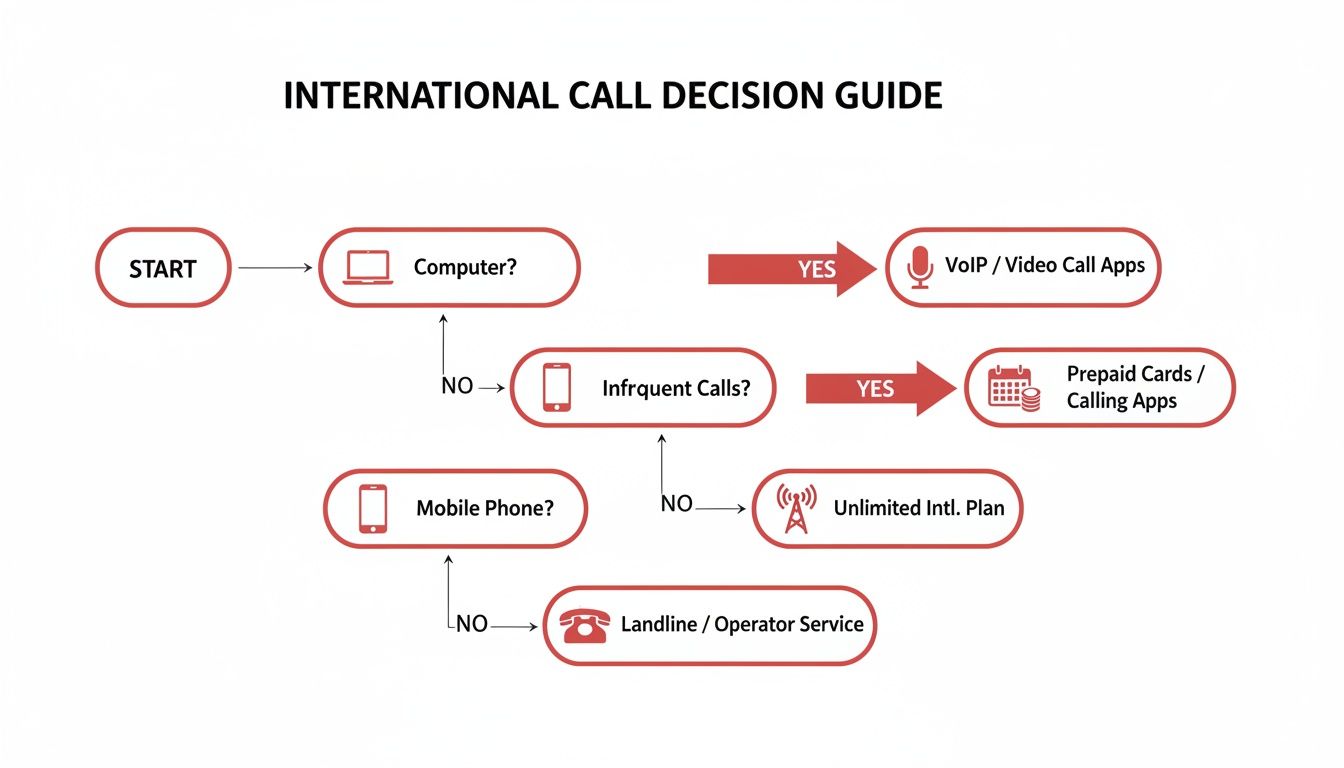
As the flowchart shows, if you’re making quick, occasional calls from a computer, a browser-based solution is the most direct route.
This immediate, browser-based approach is a game-changer compared to the old way of downloading and configuring software. For anyone who values speed and simplicity, it's the clear winner. And if you're curious about what's out there for mobile, our list of the best international calling apps offers a detailed breakdown of your options.
Finding a cheap way to call overseas is a great start, but what good is it if the call drops or sounds like you're talking through a tin can? A bad connection can ruin an important client call or a heartfelt chat with family.
The good news? You don't have to choose between saving money and having a clear conversation. A few simple tweaks can make a world of difference.
It all comes down to your internet connection. Since VoIP calls run over the internet, a stable connection is the single most important factor. Before you dial, it’s worth running a quick online speed test to check your upload speed. For sending your voice clearly, this matters even more than your download speed.
Even with a rock-solid internet connection, your computer's built-in microphone can be a real problem. It picks up every little background noise, making you sound distant or muffled. A simple, affordable headset with its own microphone is your best friend here.
A dedicated headset solves two big problems at once:
It's a small investment that pays off big in professionalism and clarity.
Looking beyond just the per-minute rate can unlock even more savings. While subscriptions have their place, a pay-as-you-go model is often far more cost-effective, especially if your calling habits change from month to month. You only pay for what you use—no monthly fees, no commitments.
For businesses or families, features like shared team credits are a game-changer. Instead of juggling several individual accounts, everyone can draw from one central pool of funds. This makes billing a breeze and ensures you're not paying for credit that sits unused in someone’s account.
Pro Tip: Another incredibly effective tool is a custom local caller ID. When you call someone overseas, they are far more likely to pick up if they see a familiar local number instead of a strange international one. This one feature can have a direct impact on your business.
The data backs this up. Using a local outbound number can boost call answer rates by a staggering 20-30%. For a small business trying to connect with international leads, that's huge. And when a five-minute daily call to Asia can cost $50 a month with a traditional carrier but just $2-3 with pay-per-minute VoIP, the savings speak for themselves.
Optimizing your setup isn't just about making cheap overseas calls; it’s a strategic move for better communication and serious cost control.
If you're curious about the technology that makes these savings possible, take a look at our article on how international calling with VoIP works.
When you're making cheap overseas calls, especially for your business, the price isn't the only thing that matters. A secure, clear connection is just as critical. Protecting your conversations and knowing how to fix the occasional hiccup is what separates a professional call from a frustrating one.

Let’s start with security. Any reputable VoIP provider worth its salt uses encrypted connections. This basically scrambles your conversation as it travels across the internet, making it gibberish to anyone who might be trying to listen in. For sensitive business talks, this is non-negotiable.
Here’s a simple rule I live by: never make important calls on public Wi-Fi. That free connection at the coffee shop or airport is often unsecured, making it a playground for bad actors. For any conversation you wouldn't want the world to hear, stick to your trusted home or office network.
Even with the best service, you might run into a glitch—choppy audio, a one-way conversation where the other person can't hear you. Don't panic. These issues are almost always easy to solve, and they usually trace back to your internet connection or browser.
If your call quality suddenly tanks, run through this simple checklist before you do anything else:
Remember, a stable connection is the foundation of a good VoIP call. If you're on Wi-Fi, simply moving closer to your router can make a huge difference. For the absolute best quality, plugging directly into your router with an ethernet cable is unbeatable.
By keeping these simple security and troubleshooting tips in your back pocket, you can handle any minor bumps in the road with confidence. It lets you focus on the conversation, not the technology, ensuring your calls are both reliable and private.
Switching to a new way of making international calls is a smart move, but it's natural to have a few questions before you start dialing. We hear the same handful of queries all the time, so let's clear them up right now.
Think of this as the final check-in before you dive in. We’ll tackle the practical, "how does this actually work?" questions to make sure you're completely comfortable.
Yes, you absolutely can. This is one of the biggest game-changers with modern browser-based VoIP services.
Platforms like YodelPhone are built to run straight from your web browser—Chrome, Safari, Firefox, you name it. It works seamlessly whether you're on a laptop, tablet, or your smartphone. This means no downloads, no installations, and no annoying update notifications. You just log in and dial. It's perfect for anyone who hates cluttering up their devices with single-use apps.
Nope, not a cent. This is a huge point of confusion for many people, but the answer is simple. The person you’re calling receives the call just like any other normal phone call to their mobile or landline.
They won't see any strange international charges on their bill. Why? Because from their end, it is a normal call.
The clever part happens on your side. You're using the internet to bypass the ridiculously expensive international carrier networks. The call then pops out on their end as a local call. They don't need an internet connection, a special phone, or any app whatsoever.
Great call quality really comes down to one thing: a stable internet connection. If you're using Wi-Fi, just being close to your router can make a big difference. For a rock-solid connection that never fails, plugging directly into your router with an ethernet cable is the gold standard.
Here's another pro tip that costs next to nothing: use a headset with a built-in microphone. Even the cheap ones that come with your phone work wonders. This little trick dramatically cuts down on background noise and kills that weird echo you sometimes get from computer speakers and mics.
That depends entirely on the service you pick. Some of the more basic services are for outbound calling only—you can call out, but nobody can call you back.
However, more complete solutions like YodelPhone let you buy your own virtual phone numbers from different countries. This gives you a dedicated local number that your friends, family, or business contacts can dial to reach you, making it a true two-way street for communication.
Ready to see just how easy it is to make cheap overseas calls? YodelPhone lets you start dialing in seconds, right from your browser. No downloads, no contracts, and no funny business with fees. Try it now with a free call.
Unlock affordable global calling with a pay as you go international phone service. Learn how to save on calls without contracts or hidden fees.

Discover how to make cheap international calls from any device. Our guide explores the best apps, VoIP services, and tips for clear, low-cost calling.

Discover the cheapest international calling rates. Our guide compares VoIP, calling cards, and browser-based services to help you save on every call.

Discover the best way to make international calls by comparing carrier plans, VoIP apps, and calling cards for cheaper, clearer connections.