
best voip services for small business
Finding the Best VoIP Services for Small Business
When you're running a small business, the phone is still your lifeline. But those old-school landlines? They're becoming an expensive liability. The best VoIP services for small businesses offer a massive upgrade in flexibility and features, often while cutting your phone bill in half. Powerhouses like RingCentral, Nextiva, and Ooma are leading the charge, giving small teams the kind of communication tools that were once reserved for massive corporations.

The move from a traditional landline to Voice over Internet Protocol (VoIP) isn't just a tech swap—it's a strategic business decision. For years, small businesses were stuck with clunky, inflexible phone systems that came with eye-watering monthly fees and surprise maintenance costs. That old model chained your communication to a physical office, a huge disadvantage now that remote work and global teams are the norm.
Choosing one of the best VoIP services for small business means cutting those chains for good. Instead of relying on ancient copper wires, VoIP sends your calls over the internet connection you already pay for. This simple change unlocks a whole suite of powerful tools and real, measurable savings, empowering your team to work smarter from anywhere.
Those old PBX (Private Branch Exchange) systems have some serious drawbacks that modern businesses just can't afford to ignore anymore. These limitations are exactly why so many are making the jump to VoIP.
VoIP systems directly solve these problems, offering a compelling alternative with immediate, tangible benefits. You'll see the return on your investment almost instantly.
VoIP adoption isn't just about saving money on a phone bill. It's about gaining a competitive edge with communication tools that were once exclusive to large enterprises, enabling small teams to punch well above their weight.
Here’s a quick look at how the two stack up. The difference is night and day.
| Feature Benefit | Traditional Landline | Modern VoIP Service |
|---|---|---|
| Cost Structure | High fixed costs, per-line fees | Low monthly subscription, scalable |
| Flexibility | Tied to a physical office location | Accessible anywhere with internet |
| Key Features | Basic call functions, voicemail | Advanced call routing, CRM integration |
| Scalability | Complex and expensive to add lines | Add or remove users instantly |
Picking the right VoIP service for your business is about more than just finding the lowest monthly price. This system will be the nerve center for your customer and team communications, so a quick, uninformed decision can lead to dropped calls, angry clients, and a lot of wasted money.
To choose wisely, you need a solid framework that prioritizes what actually matters: performance, security, and the ability to grow with you.
It all starts with call quality. Let's be honest—if your calls sound like you're underwater, none of the fancy features matter. Look for providers who guarantee HD voice and back it up with a Service Level Agreement (SLA) promising 99.999% uptime. That isn't just marketing fluff; it translates to less than six minutes of potential downtime in an entire year.
Once you’ve confirmed a provider is reliable, the next step is to dig into how they protect your conversations. Business calls often contain sensitive information, making security a non-negotiable.
A secure VoIP provider is your first line of defense in protecting your business's integrity. Don't just assume every service is the same. You need to be proactive and look for specific security protocols that keep your calls safe from end to end.
Here’s what to verify:
A provider’s approach to security tells you everything you need to know about their commitment to your business. It should never be an afterthought.
VoIP pricing looks simple on the surface, but the devil is always in the details. Most providers use a per-user, per-month model with different tiers, but what you get in each tier can vary wildly. That cheap entry-level plan might seem like a bargain until you realize it’s missing basics like call recording or key integrations, forcing you to upgrade sooner than you expected.
For small businesses, the decision almost always comes down to measurable ROI, not just brand recognition. Standard cloud VoIP plans typically range from $15 to $40 per user per month. But the real story is in the savings. With reported telecom cost reductions of 30–50% after switching, a small team of 10 currently paying $600 a month for old-school phone lines could cut that bill by $180–$300 every single month. You can dig deeper into these cost-saving trends and market data from sources like Fortune Business Insights.
Before you sign anything, list your "must-have" features and map them to each provider's pricing tiers. Calculate the total cost for your whole team—including any setup fees or hardware—to get a clear picture of the real investment.
This straightforward approach helps you pick a plan that delivers value from day one without hitting you with surprise costs down the road.
A modern VoIP system shouldn't be an island. Its real power comes from how well it connects with the other tools you rely on every day, like your CRM, helpdesk software, or team chat platforms. Before you commit, make a list of your essential software and check for native integrations.
For example, a VoIP system that talks to your CRM can automatically log calls and pull up customer details when they ring. That small automation saves your team a ton of time and makes for a much smoother customer experience. If you’re still using older tools like Skype for business calls, you’ll find that modern alternatives offer far better integrations. We cover this in our guide on finding a reliable Skype replacement.
Finally, think about where your business is headed. How easy is it to add a new team member? Can you grab a new phone number or set up an auto-attendant without jumping through hoops? The best VoIP services are designed to grow with you, letting you adjust your plan as your team expands. Choosing a flexible provider today saves you from a painful and expensive migration tomorrow.
Alright, you know what to look for in a VoIP service. Now comes the fun part: pitting the top contenders against each other.
But here’s the thing—there’s no single “best” provider. It’s about finding the right strategic fit for your business. The goal here isn't to crown a winner, but to match a provider's strengths to your real-world needs.
We're going to look at a few of the biggest names and break down exactly where each one shines. Whether you're running a remote-first startup, a high-volume sales team, or a customer-focused support desk, there’s a solution built for you.
To keep us grounded, think of this checklist. It boils down the decision to three core pillars: quality, security, and price. Everything else is just noise.
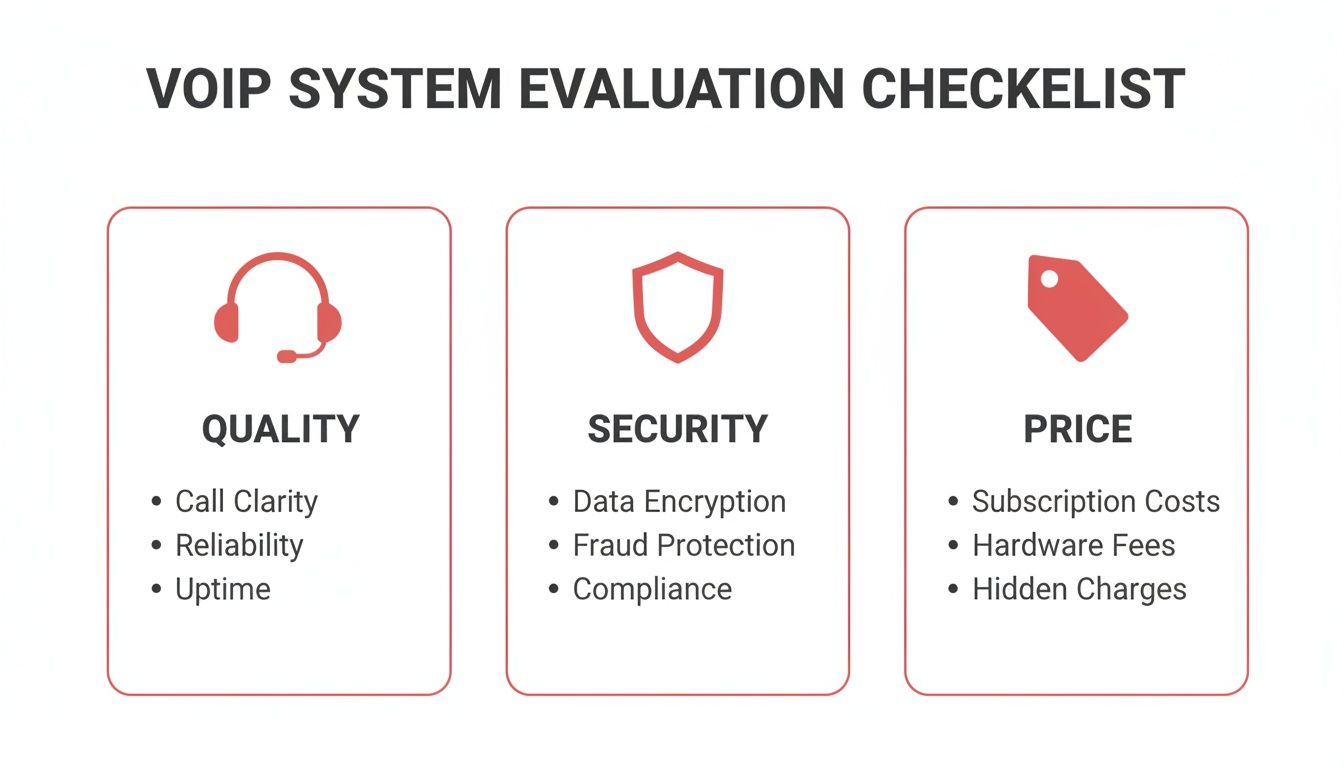
Keep these three factors in mind as we dive into how specific providers stack up.
RingCentral is the kitchen-sink solution. It's built for businesses that want one platform to handle everything—phone, video meetings, and team chat. Think of it as the ultimate software declutterer.
Its biggest advantage is this all-in-one approach. If your team is tired of juggling three different apps for communication, consolidating everything into one login and one bill is a game-changer. Imagine hopping from a client call to an internal video huddle without ever switching windows.
Nextiva carves out its niche by being laser-focused on the customer experience. Sure, it has all the standard VoIP features, but its platform is really built to help you understand and improve every single customer interaction.
We're talking about features like call analytics, customer sentiment analysis, and built-in surveys that give you real insight into your service quality. It’s less of a phone system and more of a relationship-building tool.
Nextiva’s real power is connecting communication data to business results. It doesn't just tell you who called; it helps you answer, "Were they happy?" and "How can we do better next time?"
For a lot of small businesses, especially new ones, complexity and high costs are the enemy. Ooma Office gets this. It delivers a dead-simple, reliable VoIP service that’s incredibly easy to set up, usually at a price that’s hard to beat.
You get all the essentials—a virtual receptionist, extension dialing, a mobile app—without being buried under a mountain of features you'll never use.
The appeal is its pure simplicity and affordability. You can have a professional phone system running in minutes, no IT degree required. It’s the perfect step up from using your personal cell phone for business.
YodelPhone is built for one thing above all else: connecting businesses with the world. Our browser-based platform and transparent, pay-as-you-go pricing for international calls make it a no-brainer for teams with a global footprint.
There are no confusing international plans or monthly subscriptions for global calling; you just pay for what you use. This gives you total cost control. If your international call volume goes up and down, you aren't stuck paying for a high-volume plan you don't always need.
If you’re looking for other affordable ways to connect globally, our guide to the best international calling apps offers even more ideas.
To make things even clearer, here’s a quick-glance table breaking down the key decision-making factors for each of these VoIP services.
| Provider | Starting Price (Per User/Month) | Key Differentiator | Best For | Integration Score (1-5) |
|---|---|---|---|---|
| RingCentral MVP | ~$30 | All-in-one platform (phone, video, message) | Unified communication needs | 5 |
| Nextiva | ~$24 | Deep customer analytics and CRM tools | Customer service-focused teams | 4 |
| Ooma Office | ~$20 | Simplicity and hardware ease-of-use | Budget-conscious startups | 3 |
| YodelPhone | Pay-as-you-go | Affordable international calling rates | Global and remote teams | 4 |
Ultimately, choosing the right VoIP service comes down to how your business actually works day-to-day. Use this comparison as a starting point to ask the right questions and find the provider whose strengths align perfectly with your own.
General comparisons are a decent starting point, but they rarely tell the whole story. The best VoIP service isn't a one-size-fits-all product; it’s the one that plugs directly into your company’s operational DNA. It's about matching a provider's strengths to your specific, everyday challenges.
Let's be honest, a high-volume sales team has completely different needs than a distributed creative agency. This is where we move past generic feature lists and get into practical, situational advice. By understanding what makes your business tick, you can pick a tool that doesn't just work but actually fuels your growth.
For businesses built around a remote or hybrid workforce, communication isn't just important—it's everything. Your VoIP service acts as the central nervous system, keeping your team connected and productive no matter where they log in from.
The name of the game here is mobility and unified communication. A powerful mobile app that truly mirrors the desktop experience isn't a nice-to-have; it's non-negotiable. Team members need to switch between their laptop and phone without a hitch, join meetings on the go, and access team messages instantly.
Providers that nail this typically offer:
Sales teams live and die by the phone. Their VoIP system has to be a high-performance engine, optimized for speed, efficiency, and—most importantly—data. Every second a rep spends manually dialing a number or logging a call is a second they're not selling. That's why CRM integration is the single most critical feature.
A system that automatically logs every call, text, and voicemail into your CRM (like Salesforce or HubSpot) gives your team a massive edge. This automation wipes out manual data entry, builds a complete history of every client interaction, and makes sure no lead ever slips through the cracks.
A VoIP service without deep CRM integration is like a sports car with cheap tires. You’ve got all the power, but you can’t actually put it on the road where it counts.
Power dialers, click-to-call functionality, and detailed call analytics are also must-haves. These tools help sales managers track performance, coach their reps effectively, and ultimately drive more revenue.
When your clients and team are scattered across continents, communication costs can spiral out of control fast. Businesses with a global footprint need a VoIP solution that makes international calling simple and affordable. This is where YodelPhone shines. You can learn more about how to make international calls a seamless part of your workflow with our detailed guide.
Look for providers that offer transparent, pay-as-you-go international rates instead of locking you into expensive monthly bundles. The ability to buy local phone numbers in different countries is also a game-changer, giving you an instant local presence and making it cheap and easy for international clients to reach you.
VoIP adoption is already sky-high, with 61%–68% of small businesses having made the switch, driven by cost savings of 30–50% over old-school phone systems. For global businesses, those savings are even bigger.
By matching a provider’s core features to your business model, you’re not just buying a phone system. You’re investing in a tool that solves your biggest problems and supports your long-term goals.

Picking the right provider is a huge win, but the work doesn't stop there. A smooth migration is just as critical to make sure your business calls keep flowing without a single dropped conversation.
This checklist cuts through the technical jargon. It breaks the process down into simple, manageable steps, turning what feels like a complex IT project into a straightforward upgrade. A clear plan is your best defense against common headaches like downtime, lost numbers, or a team that doesn't know how to use the new system.
Before you touch a single setting, you need to get the lay of the land. This is the foundational work that ensures your network is actually ready for high-quality voice calls.
Audit Your Internet Connection: VoIP is only as good as your internet. Run a few speed tests, especially during your busiest hours, to check both upload and download speeds. As a rule of thumb, each HD call needs about 100 kbps of dedicated bandwidth, so make sure you have plenty of room to spare.
Inventory Your Hardware: Take stock of every piece of hardware you have—desk phones, headsets, routers, you name it. Check with your new VoIP provider to see what's compatible. You'll need to know what you can keep and what needs to be replaced or updated with an adapter.
Initiate Number Porting Early: Moving your existing phone numbers (called "porting") isn't instant. It can take anywhere from a few days to several weeks. Kick off this process the moment you sign up with your new provider. And whatever you do, do not cancel your old service until you get confirmation that the porting is 100% complete.
With your plan locked in, it's time to mold the new system to fit your business. This is where you customize features so they work for you, not against you.
The global VoIP market is exploding and expected to reach between $326 billion and $415 billion by the early 2030s. This intense competition is great for you—it means providers are constantly adding better features at lower prices to win over small businesses.
A well-planned migration minimizes disruption and maximizes adoption. The goal is to make the new system feel like a natural, immediate improvement for every single team member.
Finally, it’s time to get your team ready for the switch. A little training goes a long way in making sure everyone feels confident with their new tools.
Schedule a quick training session to cover the basics: how to make and receive calls, use the mobile app, check voicemail, and transfer calls. Give them a simple cheat sheet to keep at their desks. On launch day, make yourself available to answer questions and fix any small issues.
A smooth rollout ensures your investment in one of the best VoIP services for small business starts paying for itself immediately.
Jumping into a new phone system always brings up a few last-minute questions. It's totally normal. To make sure you're moving forward with confidence, we've gathered the most common queries we hear from small business owners when they're looking at the best VoIP services. Think of this as a final check-in to cover all your bases.
Yes, absolutely. This is called number porting, and any VoIP provider worth its salt offers it. You'll just need to give your new provider your current account details, and they handle the transfer from there.
One critical piece of advice: do not cancel your old phone service until you have written confirmation that the porting is 100% complete. If you cancel too early, you could lose your number for good.
Your call quality is a direct reflection of your internet connection. For that crisp, clear HD voice you want, a stable, business-grade connection like fiber or cable is your best bet. As a rule of thumb, each simultaneous call needs about 100 kbps of both upload and download bandwidth.
A classic mistake is focusing only on download speed. VoIP is a two-way street; it relies just as much on your upload speed to send your voice clearly. Always test both before you sign up with a provider.
Modern VoIP systems are built with serious security in mind. The top providers use powerful encryption, like Transport Layer Security (TLS) and Secure Real-time Transport Protocol (SRTP). In simple terms, these technologies scramble your call data and audio, making it virtually impossible for anyone to eavesdrop.
Not unless you want them. While you can definitely buy dedicated VoIP desk phones, one of the biggest perks of VoIP is its flexibility. Most services offer softphone apps for your computer and smartphone, letting your team make and take calls from pretty much anywhere. Some even offer adapters that let you plug your old analog phones right in.
Ready for a simpler, more affordable way to make global calls? YodelPhone offers crystal-clear, browser-based international calling with transparent, pay-as-you-go pricing. Try it instantly without a credit card.

Try a free international call trial instantly in your browser - no downloads or card required. Test call quality and connect globally in seconds.

Uncover what is VoIP and how does it work with this clear, step-by-step guide. Learn the basics, benefits, and how to start making calls over the internet.

Discover how international VoIP calls can save you money and simplify global communication. Learn how they work and how to get started in minutes.

Discover how to reduce phone bills with simple audits, smarter plan choices, and money-saving tools.