
free international call trial
Free international call trial - Start seamless global calls now

Absolutely. You can get a free international call trial right from your web browser to check the quality instantly. Forget downloading apps or pulling out your credit card.
Services like YodelPhone give you a free one-minute call so you can hear the connection for yourself before you decide to spend a dime. It's the ultimate "try before you buy" for staying in touch globally.
Remember the old days of calling internationally? It was a mess. You were either fumbling with physical calling cards and their endless PINs, getting slammed with outrageous rates from your mobile carrier, or downloading clunky apps that demanded a full sign-up just to make one call.
A browser-based free international call trial cuts through all that noise.
This new way of doing things is all about speed and honesty. You can land on a website and be talking to someone on the other side of the world in less than 60 seconds. No software to install, no payment info needed upfront.
This is a huge deal for a few key reasons:
The difference between wrestling with old-school methods and making a call from your browser is night and day.
Here's a quick look at how modern browser-based trials stack up against traditional international calling methods.
| Feature | Traditional Methods | Instant Browser Trial (e.g., YodelPhone) |
|---|---|---|
| Setup Time | Minutes to hours (buying cards, downloading apps) | Under 60 seconds |
| Upfront Cost | Required (buying cards, paying for plans) | $0 (no credit card needed) |
| Downloads | Often required (apps, software) | None, works in your browser |
| Hidden Fees | Common (connection fees, maintenance fees) | None, totally transparent |
| Recipient Needs | Sometimes requires the same app | Just a regular phone (landline or mobile) |
| Quality Check | Pay first, hope for the best | Test the call quality before paying |
The table really says it all. The new approach is built for convenience and puts you in control, letting you verify the service actually works for your specific needs.
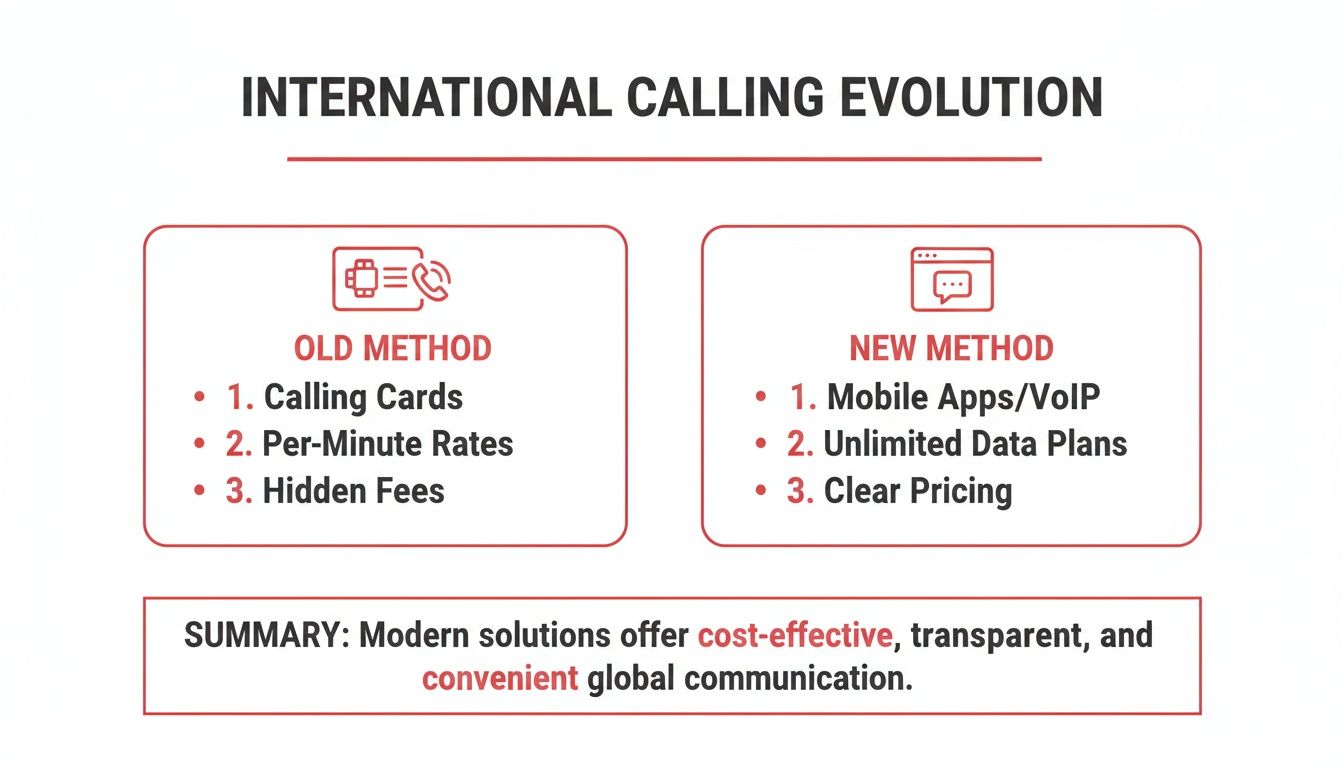
The need for simple, global communication is exploding. The market for international calling services hit USD 1.44 billion in 2024 and is on track to reach USD 2.29 billion by 2032.
What’s driving this? Mobile phones. The mobile segment owned a massive 54.7% market share in 2024, thanks to everyone having a smartphone that can easily tap into VoIP services. You can dig into the international call services market trends to see just how fast things are growing.
A trial isn't just a demo; it's a practical diagnostic tool. It lets you experience the real-world audio quality, latency, and overall stability for the specific country you need to call.
This is something the old ways could never give you. You get to make a decision based on actual performance, not just a company's promises.
Forget digging for a credit card or filling out a complicated sign-up form. The whole point of a free international call trial is to let you test the connection instantly, without any barriers.
We'll walk through how it works on a platform like YodelPhone, which is built for exactly this kind of immediate access. The goal is to get you from the homepage to a live conversation in less time than it takes to make a cup of coffee.
First thing's first: head to the website. Instead of hunting for a "Sign Up" button, you should see a web dialer right there on the homepage. That’s your starting line.
On YodelPhone’s site, for example, the dialer is front and center. It’s designed to be completely friction-free.
As you can see, there are no hoops to jump through. You just pick a country, enter a number, and you’re off.
This is where you’ll enter the full international number. It’s a common spot for small slip-ups, so take a second to get it right.
After you've entered the number you want to call, the system will ask for your phone number. Don't worry, this isn't for billing or creating a permanent account. It's a quick, one-time verification with two simple but important jobs.
First, it prevents bots and abuse of the free service. Second, and more importantly for you, it sets up your Caller ID.
This is a huge deal. It means when you call your friend or family member, they’ll see your actual number on their screen—not some weird, unknown, or blocked number. That simple step makes it much more likely they'll pick up. The system just pings a verification code to your phone via SMS. Pop that code into the browser, and you're good to go.
The entire verification is automated and takes just a few seconds. Its only purpose is to enable Caller ID and keep the trial secure, giving you a legitimate, professional-looking call from the get-go.
Once you're verified, you just click the call button. You'll hear it ringing on the other end, just like a normal phone call.
The whole process, from landing on the site to hearing that first ring, genuinely takes less than a minute. You are now officially using your free international call trial and testing the connection in real time.

That first minute of a free international call trial isn't just a quick "hello." It's your personal quality assurance test—a powerful diagnostic tool that tells you everything you need to know about the service.
If you go in with a plan, that simple one-minute demo transforms into a smart evaluation. It gives you all the data you need to make an informed choice without spending a dime.
For business users, this means being prepared. Have a specific, open-ended question ready for an international client. Instead of "Can you hear me?", try asking a partner in Germany, "Could you walk me through the market response to our latest update?" This forces a real conversation, letting you judge the connection's stability and clarity under actual working conditions.
The same idea works for personal calls. Hearing a loved one’s voice clearly from thousands of miles away is the ultimate test. Don't waste your minute on technical checks; use it to truly connect.
Think of your one-minute trial as an intelligence-gathering mission. You’re not just listening to the other person; you're listening to the quality of the connection itself. You want to pay close attention to a few key performance indicators.
Here’s your checklist for that critical minute:
This proactive approach is crucial. The market for international calling apps is booming, expected to jump from USD 1.29 billion in 2024 to USD 2.06 billion by 2032. This growth is driven by services that deliver proven, reliable quality—the very thing you're testing.
A successful trial call isn't just one that connects. It's one where the technology disappears, allowing for a seamless, natural conversation without any distracting technical glitches.
What you're looking for in a test call really depends on your needs. A business user calling a client has different priorities than someone calling their grandparents.
For instance, a sales professional might focus on how their Caller ID appears to ensure they make a professional impression. Meanwhile, someone calling an elderly parent will care more about simplicity and how loud and clear the audio is.
Before you dial, decide what a successful call looks like for you.
By going into your free international call trial with a specific goal, you turn a single minute into an incredibly valuable piece of market research. You’ll walk away with a clear verdict on whether the service is reliable enough for the connections that matter most to you. And if you're shopping around, our guide on other free internet phone services can help you compare your options.
Giving your phone number to a new service can feel a bit weird. When you're trying out a free international call trial, it’s only natural to wonder about privacy, security, and what the connection will actually sound like. Let's tackle those common concerns head-on.
You can rest easy knowing that modern browser-based calling platforms are built with security at their core. We use strong encryption to protect your conversation from the second you dial. Think of it as a private, secure tunnel just for your voice.
Your information is used for one thing only: to connect your call and verify it's really you. Nothing else.
The quality of an online call comes down to one simple thing: your internet connection. Since the call travels over the web, a stable connection means a clear conversation.
Want to make sure your trial minute sounds amazing? Here are a few quick tips:
These little tweaks can dramatically improve your call, giving you a true feel for the service's quality. If you're curious about the tech behind it all, our guide on VoIP international calling is a great place to start.
When the trial asks for your number, it’s not for marketing—it's for verification. This quick, one-time step is super important for a couple of reasons. First, it helps us stop spam and misuse, keeping the free service available for real users like you.
But more importantly, it enables your Caller ID.
Without it, your call might show up as "Unknown Number." Let's be honest, nobody answers those calls anymore. By verifying your number, the person you’re calling sees your actual phone number, making it way more likely they'll pick up.
This simple verification step is what turns your test call into a real, professional call. It ensures the person on the other end knows it's you, which makes your one-minute trial far more effective.
In short, the security checks and verification steps are all designed to protect you and make your experience better. They keep your calls private, clear, and ensure the person you're calling knows who you are.
Even with the simplest tech, a little hiccup can happen. When you’re trying out a free international call trial, the last thing you want is a glitch getting in the way. Don’t worry—most common issues have surprisingly simple fixes.
Let's walk through the top three snags people run into: audio problems, calls that won't connect, and choppy connections. This way, you can get back to your call in seconds.
Can't hear them, or they can't hear you? The first place to check is your browser's microphone permissions. It's a security feature—your browser won't let a website access your mic without your say-so. Look for a small microphone icon in your address bar and make sure you've selected "Allow."
If the call just won't go through at all, it's almost always a simple typo in the phone number. I've done it myself plenty of times. Before you try again, quickly double-check these details:
A quick page refresh is the oldest trick in the book for a reason—it works! Before you re-enter the number, hit the refresh button on your browser. This simple step clears temporary glitches more often than you'd think.
What if the call connects but sounds like a robot or keeps cutting out? That’s a classic sign of a weak or unstable internet connection. Because the call runs through your browser, it needs a steady stream of data, just like streaming a movie.
When your connection is slow, a video buffers. With a voice call, that "buffering" comes out as garbled audio or dropped words.
Here are a few quick ways to stabilize your connection:
Running through these quick checks will solve nearly any issue you encounter, ensuring your test call is crystal clear.
So, you've used your free minute. The call was crystal clear, and now you're wondering what's next.
This is where YodelPhone really stands out. Forget about being forced into a monthly subscription or getting hit with surprise charges. We operate on a simple, honest pay-as-you-go model. You're in complete control.
There are no plans to commit to, no contracts to sign, and absolutely no hidden fees. You just add credits to your account whenever you need them and only pay for the minutes you actually use. It’s the freedom traditional carriers never give you.
Transitioning from the free international call trial to a regular user is just as painless as making that first call. Adding credits is straightforward, and once you do, you unlock a whole suite of practical features designed to make your calling experience even better.
This isn't just about making more calls—it's about making smarter ones.
That last point—dedicated numbers—is a huge advantage for small businesses and remote teams looking to expand their global footprint. This strategy is right in line with what's happening in the market.
In fact, the international calling sector grew from USD 1.58 billion in 2024 to USD 1.73 billion in 2025, showing a healthy 9.4% growth rate. This boom is driven by businesses using flexible VoIP solutions to establish a presence in key markets without the massive cost of a physical office.
The real value here isn't just saving a few cents per minute. It's the flexibility to scale your communications up or down as your needs change, without ever being stuck in a commitment you don't want.
This approach is designed to bridge the gap between someone just trying out the service and a confident, long-term user. You start with a simple, no-risk test and can gradually access more powerful tools as you need them.
It’s a model that respects your budget and puts you in the driver's seat. If you're curious about other ways to connect for free, check out our guide on how to make an international call for free.
Thinking about trying a free international call? It’s smart to have questions. Here are the straight-up answers to the ones we hear most often.
Yes, 100% free. A legitimate trial, like ours, gives you a free minute to make a real international call without ever asking for your credit card.
Think of it as a test drive. We’re so confident you’ll love the call quality that we want you to experience it firsthand, no strings attached.
Nope. No apps, no software, no installers. The entire experience happens right in your web browser.
Just open YodelPhone on your computer or phone, dial the number, and you're connected. As long as you have a browser like Chrome or Safari, you're good to go.
Absolutely not. For the person you're calling, it's just like getting a normal phone call.
It rings on their landline or mobile phone just like any other call would. They won't see any extra charges or even know you're using a special service—especially if you verify your caller ID so they see your real number.
Ready to make a crystal-clear, secure international call in under a minute? Start your free trial with YodelPhone today and hear the difference for yourself.

Discover the cheapest way to make international calls with practical VOIP tips, compare plans, and cut costs while keeping call quality high. Start saving now.

Best way to call overseas: compare VoIP, carriers, and apps to find affordable, reliable international calling options.

Discover the cheapest way to call internationally. We compare VoIP, carrier plans, and apps to help you find the best rates and start saving money today.

Discover the cheapest way to call overseas with 7 proven options for 2025, from apps to VOIP services, and save on international calls today.